

Banking on Your Time!
Gain control of your account with Online Banking. You can sign up for account alerts, transfer funds, set up recurring transfers, monitor your account, pay bills, set up budgets, and so much more. For a sneak peek, check out our demo below.
Where do I login to Online Banking?
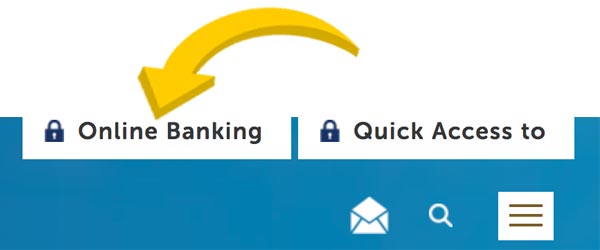
Go to the upper right-hand corner of the Home Page (above and to the left of the envelope, the search magnifying glass, and the box with the three horizontal lines in it). Click on where it says "Online Banking".

Don't have Online Banking?
Reasons Why You Should Enroll
Hover or tap on each one below to learn more.

#1
Check Account Balances
& History
Check Account Balances & History
It’s easy to quickly check your account balances and your account history

#2
Transfer Funds
Between Accounts

Transfer Funds Between Accounts
You can transfer funds between accounts, set up automatic recurring transfers, pay people using Popmoney, and transfer money to accounts you have at other financial institutions

#3
Get Alerts Via
Email or Text Messages
Get Alerts Via Email or Text Messages
Be alerted when your balance is high or low, or receive a weekly notification of your balance. You can receive these via email or text message.

#4
Pay Your Bills
Online
Pay Your Bills Online
Pay your bills within Online Banking with Bill Pay! This FREE tool will also remind you of upcoming due dates, and much more.

#5
Money Management
Tool
Money Management Tool
This tool allows you to view your spending habits over time, set budgets/goals, look at your overall financial picture… including your credit cards, loans at other institutions, retirement accounts, and more!
Learn More
#6
Text Message Banking
& Text Alerts
Text Message Banking & Text Alerts
After opting in you can send a text message to a specific code and get your balance, make transfers, etc.
Steps to Opt In
Note: Setting this up can only be done within Online Banking using our website, NOT via our mobile app.

SAVE PAPER - SIGN UP FOR ESTATEMENTS
Learn More